
Flutter Optimization

Author: Vikranth Salian
May 2026


Improving Flutter Performance
Flutter apps are often performant by default, but it’s fairly typical to become trapped with everyday activities in Flutter App development. When creating a new Flutter project, it’s worth paying attention to several aspects, such as tooling, packages, file structure, state management solution, or testing plan. Decisions made early have a significant impact on the future of any large-scale project.
Code Analysis Tool
First of all, we need a code analysis tool that signals inaccuracies requiring improvement. Such a tool helps keep code clean and removes a large number of programming errors. We recommend kits that comply with the Dart Style Guide, such as lint or flutter_lints.
Sorting structure of files in the project
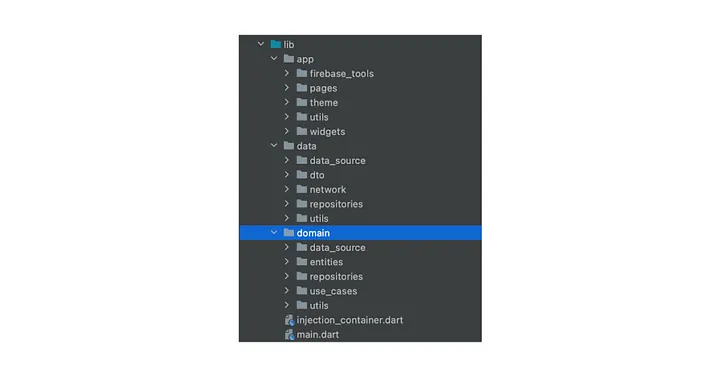
To maintain cleanliness and facilitate navigation for all developers, creating an appropriate folder structure (pages, widgets, themes, utils, domain, data) is essential. This allows any developer to easily navigate the codebase.
Separate environments for separate processes
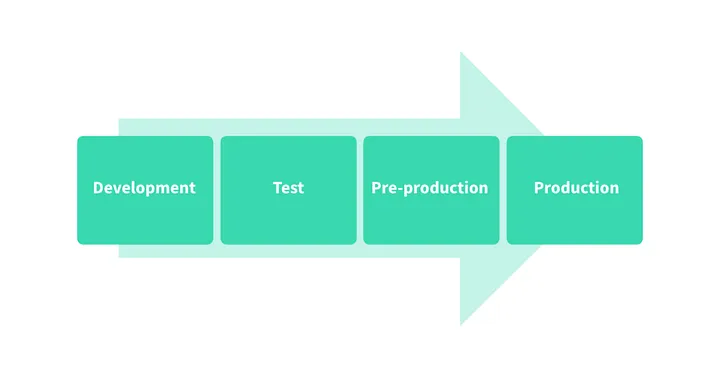
To avoid production errors, we utilize individual environments: development, staging, and production. This ensures that experimentation happens safely away from real users.
1. Development environment
Where programmers freely experiment and make changes without affecting the live application. Rollbacks are easy, and innovation is encouraged.
2. Staging environment
An intermediate step between dev and production. Here, we test snapshots of production data to ensure no "surprises" reach our users.
3. Production environment
Used by real users. Zero tolerance for corrupted data. Tools like Appcircle, Codemagic, or Bitrise help automate these release cycles.
Crash recorder for your application
Observability is key. Services like Sentry, Firebase Crashlytics, and Datadog provide the crash reports and notifications needed to maintain high application quality.
Users behavior analysis
Understanding user journeys via Firebase Analytics or App Center Analytics allows us to optimize flows and improve the overall efficiency of the application.
README file
A well-maintained README file containing commands for generating, testing, and running code is a team's best friend. It centralizes decisions and architecture diagrams for everyone.
Rebuild only what you need
A common mistake is rebuilding entire widget trees with setState. As apps grow, this causes performance degradation. We recommend the BLoC (Business Logic Controller) pattern for state management.
BLoC relies on four main layers: UI, BLoC, Repository, and Data Sources. This ensures a clean separation of concerns and reactive data flow via Streams.